A workspace that fits your world.
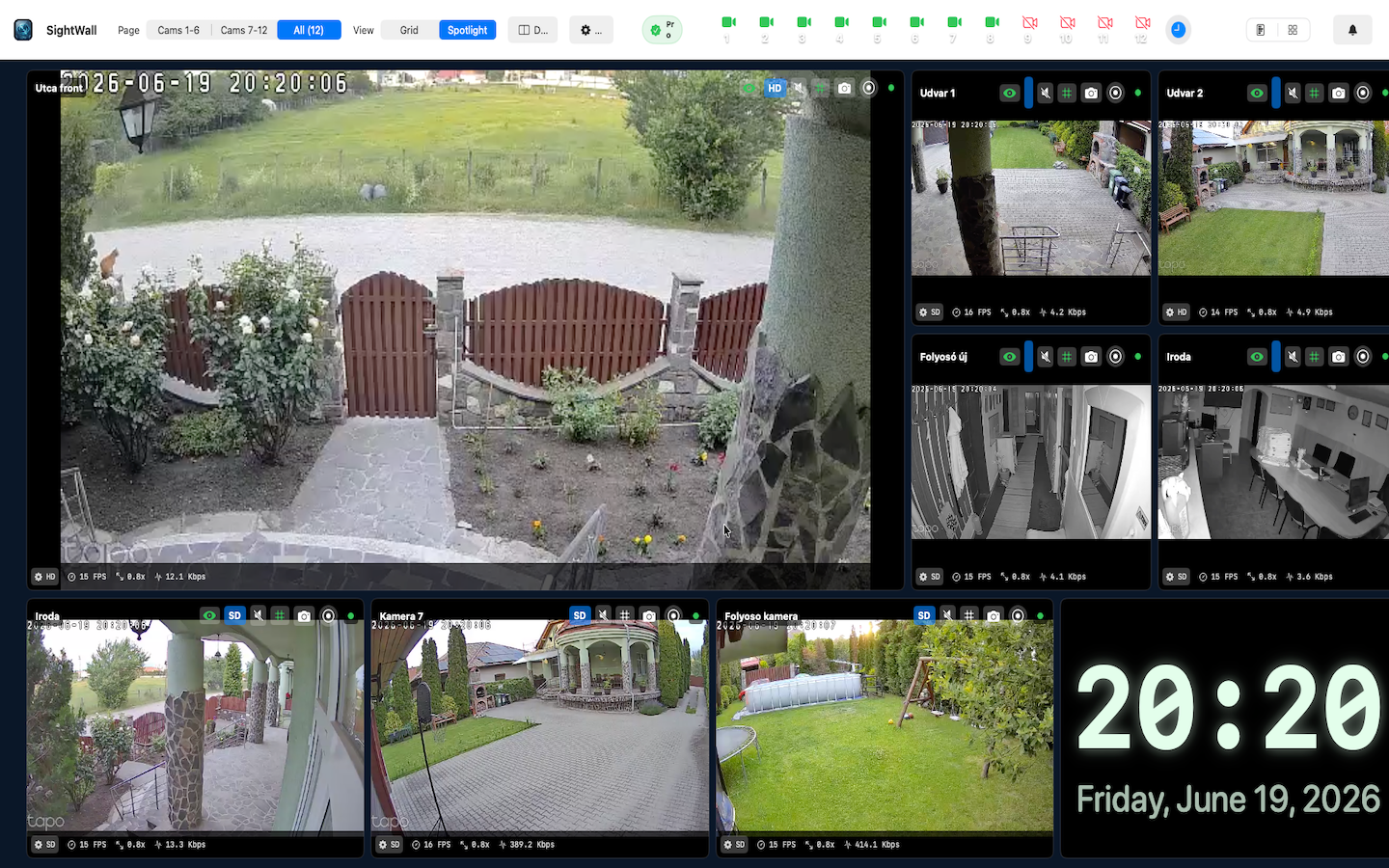
Switch between a camera grid and Spotlight. Save your favourite layouts and spread your camera views across windows and displays.
 SightWallCamera
YOUR SPACE. YOUR PERSPECTIVE.
Turn your Mac into a camera wall. Bring up to 12 compatible cameras together, focus on what matters, and keep your recordings close.
14 days free · One-time Pro purchase · No subscription
Primarily designed for RTSP-capable Tapo cameras. Also works with other compatible RTSP cameras.
THE BIG PICTURE, BEAUTIFULLY SIMPLE
Your entrance. Your workshop. The quiet corner of your garden. Bring them into one workspace, then give the view that matters the attention it deserves.
Actual SightWall Camera interface. Camera availability and layouts depend on your setup.
Switch between a camera grid and Spotlight. Save your favourite layouts and spread your camera views across windows and displays.
Record video and capture snapshots to a folder you choose. Browse your media, revisit the timeline and find saved clips through event history.
Detect people and animals on your Mac. Set detection zones, local alerts and automatic recording to fit the places you watch.
LOCAL BY DESIGN
A direct connection to your compatible cameras. Recordings stored where you choose. Camera passwords protected by macOS Keychain. No SightWall account to create. No ads.
Read our privacy policy ↗FROM CAMERA TO CLARITY
Put your Mac and camera on an accessible local network. Enable RTSP and create local camera credentials if your model requires them.
Use guided ONVIF discovery for compatible cameras, or enter an RTSP stream manually. Test the picture before saving.
Choose your layout and recording folder. Your 14-day trial starts when your first saved camera shows live video.
CHECK BEFORE YOU CONNECT
SightWall Camera is primarily designed for Tapo cameras that provide a local RTSP stream. Other brands can also connect when they provide a compatible RTSP stream. Use guided ONVIF discovery where supported, or enter the manufacturer’s RTSP settings manually. Compatibility depends on the camera model, firmware and configuration.
Examples of outdoor Tapo models listed by TP-Link for RTSP/ONVIF streaming (Tapo C310, Tapo C320WS, Tapo C325WB, Tapo C500, Tapo C510W, Tapo C520WS, Tapo C530WS, Tapo C560WS, Tapo C575D, Tapo C710, Tapo C720). This is a protocol compatibility reference, not a claim that every hardware and firmware version has been individually tested with SightWall. Check your specific camera version and use the free trial to confirm live video. Multi-lens streams and available features vary by model.
TP-Link RTSP setup and supported models ↗
SightWall is an independent app by SEISHIN TEAM S.R.L. It is not affiliated with or endorsed by TP-Link or Tapo. Tapo and TP-Link are trademarks of their respective owners.
Not every Wi-Fi camera supports RTSP. Cloud-only cameras cannot connect. Stream capacity and quality depend on your camera, network and Mac. Detection depends on lighting and scene quality and does not replace a security monitoring service.
TAKE A CLOSER LOOK
Explore full camera functionality for 14 days. Continue with SightWall Pro Lifetime through a one-time in-app purchase. The App Store shows the price before you buy.
Try free on MacThe trial never charges automatically. The built-in app demo and setup previews do not start your trial.
A FEW THINGS TO KNOW
Yes. Open “Try demo…” from the SightWall menu to explore the built-in sample camera wall. The demo uses prerecorded examples, works without camera hardware and does not start the trial.
No. After the 14-day trial, continued live viewing and Pro features require the one-time SightWall Pro Lifetime in-app purchase. There is no monthly or yearly SightWall subscription.
No. SightWall connects directly to your cameras and saves recordings in your selected folder. Choose a local folder if you want files to remain only on your Mac; a cloud-synced folder may sync through its provider.
Check RTSP support, the local camera account, the stream address and macOS Local Network permission. Guest Wi-Fi or router isolation can block discovery. Try manual RTSP setup.
No. Tapo RTSP cameras are the primary focus, but other compatible RTSP cameras can also be used. Check that your specific model supports a local RTSP stream. For Tapo, enable RTSP and create a local camera account in the Tapo app if required; this may differ from your TP-Link cloud account.